

Account readiness checklist
Use this checklist to decide whether your team is ready to receive real customer work. Complete it with an administrator and an intended agent. A saved setting is configuration evi
Required · Practice and finish setup
Use this checklist to decide whether your team is ready to receive real customer work. Complete it with an administrator and an intended agent. A saved setting is configuration evidence; a completed customer journey is functional evidence.
Keep a small record with the owner, date, result and any remaining action for each area. Mark optional capabilities not selected instead of enabling them merely to make the checklist look complete.
1. Verify account and staff setup
- Reopen Settings → Account → Configuration / Style. Confirm your support organization’s identity.
- Reopen Account → Feature Modules and Policies. Confirm the selected capabilities and reviewed regional/security choices.
- Confirm the division and team have understandable purposes and accurate service hours.
- Have an ordinary agent sign in and demonstrate the allowed work. Check an excluded operation as well.
- Confirm the receiving queue is visible and monitored, with direct membership and automatic-assignment participants reviewed separately.
- Confirm Harbor and its contact are correctly associated and selectable on a case.
| Check | Evidence to retain |
|---|---|
| Account identity and dates | Reopened settings and a refreshed agent view. |
| Staff access | Agent sign-in plus allowed/excluded operation results. |
| Customer records | Correct saved company/contact relationship. |
| Queue ownership | Controlled case reaching the monitored queue and next owner. |
2. Verify case handling
- Have an agent explain Priority, Status/state, Issue and Activity type using the training case.
- Confirm required case fields are visible and understandable.
- Check any custom field retains its saved value.
- Verify team/queue hours and holidays.
- If using SLA targets, compare actual matching/nonmatching and boundary-case deadlines with the intended commitment.
Existing defaults are acceptable when they fit the agreed process. Record that they were reviewed; creating more options is not a success criterion.
3. Verify every selected channel
| Selected channel | Required evidence |
|---|---|
| New message creates the correct case; agent reply arrives with the right sender/signature; customer reply returns to that case; authentication checked. | |
| Portal | Intended customer can sign in and submit/follow a request; unrelated customer cannot see it; internal notes stay internal; narrow-screen path works. |
| Chat | Visitor reaches an eligible agent; case/transcript and owner are correct; no-agent and after-hours outcomes work; any promised email actually arrives. |
If forwarding, DNS, provider authorization, website installation or a controlled recipient is unavailable, record the exact dependency and owner. Do not mark that channel ready from a screenshot or configuration save.
4. Verify knowledge, automation and integrations
Open each starter article as the intended reader. Check publication, audience, images, links and the actual displayed summary. Search by natural customer questions as well as exact titles.
For each enabled workflow, retain one matching and one nonmatching result. For AI, retain representative, ambiguous and incomplete-source checks and the human review responsibility.
For Intercom or Azure DevOps, retain the actual provider-to-case result and limitations. If unused, mark not applicable. A connection check alone does not prove the complete operational handoff.
5. Demonstrate one complete support interaction
Have the agent show the same training case through intake, assignment, customer reply, internal note, handoff, resolution and closure. Confirm that the second agent could pick it up without relying on a verbal explanation. Open the final record and verify Closed status.
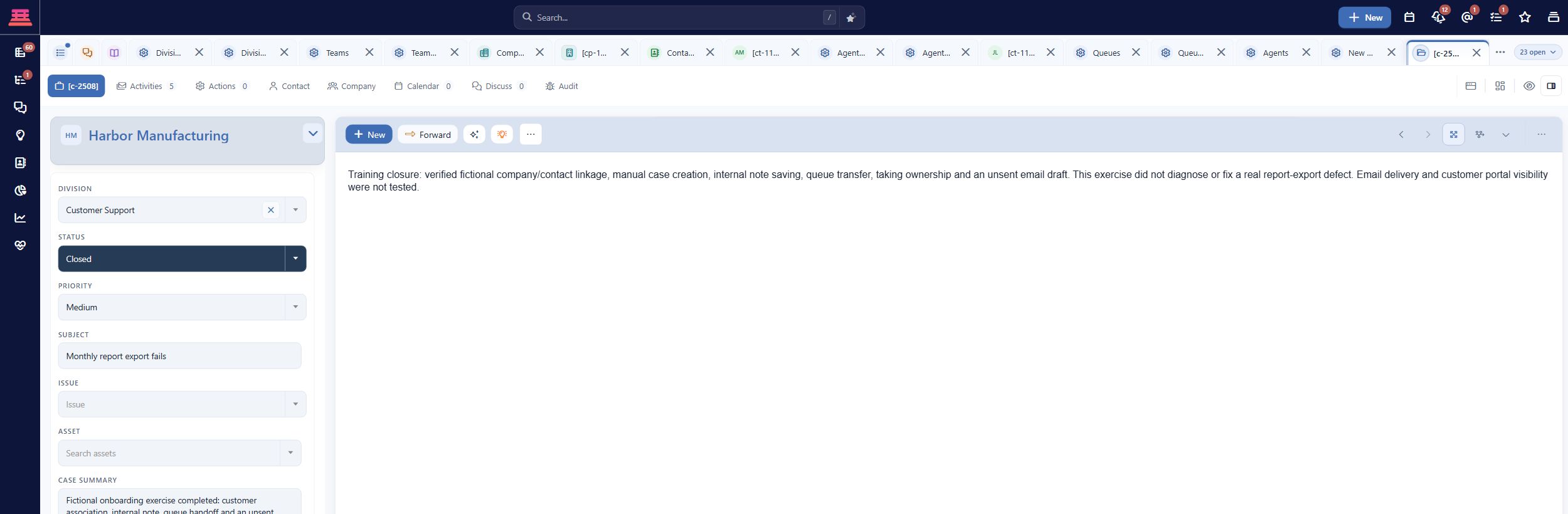
Saved fictional practice case with Status Closed; delivery and portal visibility remain untested.
If you used drafts or an internal-only test, record that clearly. It verifies the agent procedure, while customer delivery remains a separate outstanding test.
6. Assign ownership and decide readiness
For each unfinished item, record:
- The exact missing result, rather than “needs testing.”
- The person responsible.
- The next action and target date.
- Whether it blocks the selected launch channel.
Examples: “Mailbox administrator must verify forwarding to the saved route”; “Agent must confirm external reply receipt”; “Portal owner must test an unrelated customer”; “Optional chat deferred.”
Start real work only when the selected channel has a monitored destination, permitted agents, correct customer identity and a verified response path. Keep a named owner for unassigned work and absences. Daily support operations and the case lifecycle are the ongoing companions.
Completion check
- Required account, access, customer and case setup is verified.
- At least one selected channel passes its complete conversation test.
- An agent demonstrates the support lifecycle.
- Audience restrictions and knowledge links are checked.
- Optional capabilities are either tested or deliberately deferred.
- Every remaining dependency has an owner and an honest status.
Updated 27 minutes ago
What’s Next
Review any unfinished setup before inviting customers.